|
ViennaSHE 1.3.0
Free open-source semiconductor device simulator using spherical harmonics expansions techniques.
|


|
|
ViennaSHE 1.3.0
Free open-source semiconductor device simulator using spherical harmonics expansions techniques.
|
|
First user customizations should ideally be based on the example code in examples/devices/. We also advise new users to go through the ViennaGrid manual, as mesh traversal is essential when dealing with more complicated devices.
In the following we wil go through the steps involved in a device simulation in essentially chronological order. Thus, the flow of discussion here follows that of the Examples.
The device class of ViennaSHE is a description of the physical device and is a-priori independent of any simulator acting on the device. Thus, the quantities accessible through the device class are considered to be intrinsic quantities of the device, not model-specific. Hence, model-specific parameters such as phonon scattering energies need to be set in the respective simulator configurations instead, which will be discussed later.
The very first step is to instantiate a device object. The only template parameter required is the type of the underlying ViennaGrid mesh. Relevant mesh types are defined in the file viennagrid/config/default_configs.hpp, of which the relevant types for ViennaSHE are:
| Mesh type | Description |
|---|---|
viennagrid::line_1d_mesh | Standard one-dimensional mesh |
viennagrid::triangle_2d_mesh | Triangular mesh in 2D |
viennagrid::quadrilateral_2d_mesh | Quadrilateral mesh in 2D |
viennagrid::tetrahedral_3d_mesh | 3D mesh consisting of tetrahedra |
viennagrid::hexahedral_3d_mesh | 3D mesh consisting of hexahedra |
With this, a two-dimensional triangular grid object is for example instantiated by
typedef viennagrid::triangle_2d_mesh       MeshType;
typedef viennashe::device<MeshType>        DeviceType;

DeviceType my_device;
Although the two type definitions can be fused together, it is often handy to have an explicit MeshType defined if manipulating quantities on the mesh. Further details on mesh traversal can be found in the ViennaGrid manual.
To fill the domain with data from one or more mesh files, one provides the filename as an argument to the member function load_mesh():
try {
  my_device.load_mesh("my_meshfile.mesh");
} catch (...){ ... } //catch exception here
Currently supported mesh types are unstructured VTK meshes and meshes generated from Netgen.
As an alternative to reading a mesh from file, a simple mesh generator for one- and two-dimensional device geometries is shipped with ViennaSHE. The mesh is specified in terms of segments, where each segment is specified by a reference point, a length, and the number of points along the coordinate direction. Finally, the mesh is generated by passing the configuration object to the member function generate_mesh() of the device object:
viennashe::util::device_generation_config generator_params;
generator_params.add_segment(0.0,  1e-6, 10);  //start at x=0, length 1e-6, 10 points
generator_params.add_segment(1e-6, 1e-6, 10);
generator_params.add_segment(2e-6, 1e-6, 10);
generator_params.add_segment(3e-6, 1e-6, 10);
generator_params.add_segment(4e-6, 1e-6, 10);

my_device.generate_mesh(generator_params);
This generates a one-dimensional mesh with five consecutive segments, each one micron long and consisting of ten points.
As the vertex coordinates in ViennaSHE are always specified in SI units (meter), the device coordinates read from the mesh file might carry a different unit. In such case, use the member function scale(). For example, to scale a mesh specified in centimeter accordingly, use
my_device.scale(1e-2);
An overview of the individual quantities to be set for a device are discussed in the following subsections.
The lattice temperature, which defaults to 300 Kelvin, can be set for either individual cells, segments, or the full mesh. Setting the lattice temperature for segments or the full domain results in the particular value being written to each cell.
To set the lattice temperature uniformly over the whole device to a value t (in Kelvin), one calls the overloaded member function set_lattice_temperature as
my_device.set_lattice_temperature(t);
In this way one can specify and arbitrarily complicated temperature profile across the device. For example, to set the lattice temperature to 400 Kelvin at a cell c, but use 300 Kelvin elsewhere, the lines
my_device.set_lattice_temperature(300);    //set over all cells of domain
my_device.set_lattice_temperature(400, c); //set for cell c
are sufficient.
The lattice temperature at each cell can be queried by calling the member function get_lattice_temperature() providing the particular cell as parameter.
Donor and acceptor doping can be set for cells, segments, or the full domain. Setting either of the dopings for segments or the full domain results in the particular value being written to each cell.
The particular type of doping to set is selected by the name of the member function, being set_doping_n() for donator doping and set_doping_p() for acceptor doping. Similar to setting the lattice temperature, the first argument is the doping concentration in SI units (  ), while the second argument is the cell, or segment. If only one argument is provided, the doping is set uniformly for the whole device. Doping concentrations may be queried from the device using the member functions
 get_doping_n() for donator doping and get_doping_p() for acceptor doping, supplying either the particular vertex or cell as parameter. In addition, one may also use the member function get_doping() and supply as second argument viennashe::ELECTRON_TYPE_ID for donator doping, or viennashe::HOLE_TYPE_ID for acceptor doping.
The available material types in ViennaSHE are:
| Class | Material |
|---|---|
viennashe::materials::metal | Metal (Conductor) |
viennashe::materials::si | Silicon |
viennashe::materials::sio2 | Silicon dioxide |
viennashe::materials::hfo2 | Hafnium dioxide |
The material is set by supplying either an object of the selected material class to the member function set_material() along with an eventual cell or segment as second parameter, or by supplying the numerical identifier id defined in each of the material classes:
using namespace viennashe;
my_device.set_material(materials::si());        //set silicon everywhere
my_device.set_material(materials::sio2(), seg); //set SiO2 for segment 'seg'
my_device.set_material(materials::hfo2::id, c); //set HfO2 for cell c
By default, all cells are set to silicon, hence one only needs to adjust the material for regions with a different material. The typical use case is to set the contacts and oxides, yet we recommend to always specify the material for each cell or segment explicitly to make the code more self-documenting. Also keep in mind that contact cells/segments have to be specified as metal, otherwise the simulation will ultimately fail.
The material for a certain cell is read using the member function get_material() and returns the numerical ID. This numerical ID returned then needs to be checked for matching any of the materials defined in the table above by the user.
In order to apply voltage biases in ViennaSHE, one needs to set the contact potential. A contact potential refers to the voltage one would externally apply using a power source and does not include any built-in potential. Internally, the contact potential is added to the built-in potential in ViennaSHE and used for the simulation. Also, any potential profiles written to files always includes the built-in potential.
The contact potential can be set for cells or segments, respectively. The most convenient way is to use meshes with separate contact segments, as this reduces the code required to set the material and the contact voltage to one function call each. To set a contact voltage of 1 Volt for a cell c and a segment seg, the lines
my_device.set_contact_potential(1, c);
my_device.set_contact_potential(1, seg);
are sufficient.
Similar to material properties, traps are configured on a per-cell basis. In order to specify a trap at a particular cell within the device, an object of type viennashe::trap_level needs to be filled with the appropriate values first. These values specify the collision cross section, the trap density, the trap energy relative to the center of the band gap, and the occupancy. For self-consistent simulations, the specified trap occupancy is used as initial guess.
A trap level with a collision cross section of  , a trap density of
 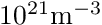 , and an energy of 0.3 eV above the center of the band gap is specified as
viennashe::trap_level trap;
trap.collision_cross_section(3.2e-20);  //unit: m^2
trap.density(1e21);                     //unit: m^{-3}
trap.energy(viennashe::physics::convert::eV_to_joule(-0.3));
device.add_trap_level(trap, c);
A segment can be supplied as second argument to add_trap_level() to set the same trap level over the whole segments. If the second argument is not supplied, the trap level is applied to the whole device, but ignored for materials other than silicon. The trap configuration for the whole device can be cleared using the member function clear_traps().
To provide good initial guesses for self-consistent SHE simulations, ViennaSHE includes a drift-diffusion simulation module. However, the purpose of this module is to provide a good initial guess for the SHE simulations only and is not intended to compete with other full-fledged drift-diffusion-based device simulators such as Minimos-NT [18].
In order to instantiate a drift-diffusion simulator, a configuration class needs to be provided. This configuration object is of type viennashe::dd::simulator_config and allows for a configuration of the linear solver by its linear_solver() member as well as a configuration of the nonlinear solver by its nonlinear_solver() member. A further description of the options available in the two solver configuration objects is postponed to the solver configuration section.
The typical code for setting up the drift-diffusion simulator object is
viennashe::dd::simulator_config dd_cfg;
set configuration parameters here
viennashe::dd::simulator<DeviceType> dd_simulator(dd_cfg, id);
where id is an arbitrary simulator ID an may be used for launching different drift-diffusion simulations on the same device. As the simulation configuration object dd_cfg and the id may be omitted if the default values are acceptable, the above lines might even be reduced to
viennashe::dd::simulator<DeviceType> dd_simulator;
The simulator is then launched by passing the device to the functor-interface:
dd_simulator(device);
Upon successful completion of the simulation, the potential, the electron density, and the hole density may be accessed for further processing via the member functions potential(), electron_density(), and hole_density(). These member functions return a wrapper object which can be evaluated at each vertex in the simulation domain. The types of these wrapper objects are available from the simulator object directly:
typedef viennashe::dd::simulator<DeviceType>  DDSimulator;
DDSimulator::potential_type        pot = dd_simulator.potential();
DDSimulator::electron_density_type n   = dd_simulator.electron_density();
DDSimulator::hole_density_type     p   = dd_simulator.hole_density();
Note that in a template scope an additional typename is required at the beginning of lines two to four. To evaluate the potential at a vertex v, one can now simply write
double potential_at_v = pot(v);
and similarly for the carrier densities. Keep in mind that the returned potential includes the built-in potential.
Similar to the drift-diffusion case, the SHE simulator object is instantiated by providing an appropriate configuration object of type viennashe::she::simulator_config. However, before passing the configuration object the the simulator constructor, one may usually want to set options accordingly:
| Member Function | Purpose | Default |
|---|---|---|
with_electrons() | Enable SHE for electrons | true |
with_holes() | Enable SHE for holes | false |
with_traps() | Include traps in simulation | false |
dispersion_relation() | The dispersion relation to use | Modena |
max_expansion_order() | The maximum SHE expansion order used | 1 |
adaptive_expansions() | Use adaptive SHE expansions | false |
min_kinetic_energy_range() | Minimum kinetic energy range to consider | 1 eV |
energy_spacing() | The energy mesh size | 31 meV |
scattering() | Configuration of scattering mechanisms | - |
linear_solver() | Linear solver configuration | - |
nonlinear_solver() | Nonlinear solver configuration | - |
It is possible to use a SHE for electrons and holes simultaneously, having them interact by traps located in the bandgap. Details on the physics involved can be found in a recent paper [21]. In particular, traps can only be considered if SHE for both electrons and holes is used.
The available dispersion relations have been discussed already. The respective identifiers are obtained directly from the class viennashe::she::simulator_config:
| Dispersion relation | ID in simulator_config |
|---|---|
| Parabolic model | parabolic_dispersion |
| Modena model | modena_dispersion |
| Extended Vecchi model | ext_vecchi_dispersion |
For example, changing the default Modena dispersion model to the extended Vecchi model can be accomplished with
typedef viennashe::she::simulator_config   SHEConfig;

SHEConfig she_config;
she_config.dispersion_relation(SHEConfig::ext_vecchi_dispersion);
The scattering configuration object provides the following member functions:
| Member Function | Purpose | Default |
|---|---|---|
acoustic_phonon() | Whether acoustic phonon scattering is enabled | true |
optical_phonon() | Whether optical phonon scattering is enabled | true |
ionized_impurity() | Whether ionized impurity scattering is enabled | true |
impact_ionization() | Whether impact ionization scattering is enabled | false |
electron_electron() | Whether electron-electron scattering is enabled | false |
For example, electron-electron scattering is enabled by using
config.scattering().electron_electron(true);
However, it is important to keep in mind that electron-electron scattering can be quite time and memory consuming [22].
With the SHE solver configuration object defined, the SHE simulator object is instantiated with
viennashe::she::simulator<DeviceType, VectorType> she_simulator(she_config, id);
Again, id is an identifier integer which can be provided by the user and defaults to zero if omitted. Similarly, default configuration parameters are used if the configuration object is omitted. The solver can then be launched via the functor interface:
she_simulator(device);
In this simplest form, initial guesses for the potential and the carrier densities are derived from the doping concentrations within the device. If one wishes to reuse the results from the drift-diffusion simulation, one can supply the quantities as additional parameters:
she_simulator(device,
              dd_simulator.potential(),
              dd_simulator.electron_density(),
              dd_simulator.hole_density());
Upon completion of the simulation, the potential and the carrier densities can be obtained in the same way as for the drift-diffusion simulator. In addition, the trap occupancy can be obtained via the member function trap_occupancy() returning a wrapper object which can be evaluated on each cell.
The computed distribution function can be obtained by various member functions returning different wrappers:
| Member Function | Purpose |
|---|---|
she_df() | returning expansion coefficients  (vertex/edge) (vertex/edge) |
interpolated_she_df() | Wrapper returning expansion coefficients (vertex) |
df() | Wrapper returning an evaluator for 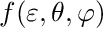 |
generalized_df() | Wrapper returning an evaluator for  |
edf() | Wrapper for evaluating the EDF  |
generalized_edf() | Wrapper for the generalized EDF 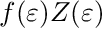 |
While she_df returns the SHE expansion coefficients at the topological elements where they are defined within the discretization, i.e. even-order expansion coefficients on vertices, odd-order expansion coefficients on edges, interpolated_she_df returns an interpolated solution with all defined on vertices. The wrappers for a direct evaluation of the (generalized) (energy) distribution function are mainly for convenience, but their evaluation is rather costly. Details on the different calling interfaces can be found in the Doxygen manual in folder doc/.
The drift-diffusion as well as the SHE simulations require the solution of a nonlinearly coupled system of partial (integro-)differential equations, which is solved by linearization methods requiring the solution of a system of linear equations in each step. For unification purposes, both the linear and nonlinear solver are configured in separate configuration objects.
There are two different types of nonlinear solvers available: The first is a so-called Gummel iteration, which is often termed Picard-iteration in the mathematical literature. The second type of nonlinear solver is Newton's method, which shows superior (quadratic) convergence speed close to the solution. However, Newton's method may fail if the initial guess is not sufficiently close to the actual solution, in which case the more robust Gummel iteration is preferable due to its higher robustness. In general, users of ViennaSHE will have to adjust linear and nonlinear solver parameters if slow or no convergence for a particular device is obtained.
The nonlinear solver IDs available in viennashe::solvers::nonlinear_solver_ids are as follows:
| ID | Nonlinear Solver |
|---|---|
gummel_nonlinear_solver | Gummel iteration |
newton_nonlinear_solver | Newton's method |
By default, Gummel iteration is used. To use Newton's method for drift-diffusion, one writes
dd_cfg.nonlinear_solver().set(viennashe::solvers::nonlinear_solver_ids::newton_nonlinear_solver);
in the drift-diffusion configuration object dd_cfg. Similarly, one can activate Newton's method for SHE. However, note that the current implementation of Newton's method for SHE requires high damping in order to sufficiently stable, thus reducing convergence speed.
Other configuration parameters for the nonlinear solver configurations are as follows:
| Member Function | Purpose |
|---|---|
tolerance | Returns/Specifies the relative tolerance for which convergence is considered to be achieved. |
max_iters | Returns/Specifies the maximum number of iterations for the nonlinear solver. |
damping | Returns/Specifies the damping parameter. Typical values are in the range ![$[0, 1]$](form_8.png) . Values closer to zero indicate stronger damping. . Values closer to zero indicate stronger damping. |
The respective parameter is queried by supplying no arguments to the member function. To set a new parameter, supply the new value as argument to the member function.
The respective linear solver is specified by one of the identifiers in viennashe::solvers::linear_solver_ids:
| ID | Linear Solver |
|---|---|
dense_linear_solver | Direct Gauss' solver |
serial_linear_solver | BiCGStab solver with ILU0 preconditioner |
parallel_linear_solver | BiCGStab solver with block-ILU0 preconditioner |
gpu_parallel_linear_solver | GPU-assisted BiCGStab solver with block-ILU0 preconditioner |
By default, serial_linear_solver is used. Details on the block-based parallel preconditioners can be found in the literature [20] [23] . Also note that parallel_linear_solver requires the preprocessor constant VIENNASHE_HAVE_PARALLEL_SOLVER to be set and to link with Boost.thread. To use the GPU-accelerated solver with ID gpu_parallel_linear_solver one needs to set VIENNASHE_HAVE_GPU_SOLVER in addition and link with OpenCL. This is accomplished in the CMake file included in ViennaSHE by the respective options called ENABLE_BOOST_THREAD and ENABLE_OPENCL, which can be set via the CMake GUI.
serial_linear_solver is used.Other parameters partly used by the different solvers above are the following:
| Member Function | Purpose |
|---|---|
tolerance | Returns/Specifies the relative tolerance for which convergence in an iterative solver is considered to be achieved. No effect for a direct solver. |
max_iters | Returns/Specifies the maximum number of iterations for the nonlinear solver. No effect for a direct solver. |
ilut_entries | Returns/Specifies the maximum number of entries per row in ILUT. No effect if ILUT is not in use. |
ilut_drop_tolerance | Returns/Specifies the drop tolerance for ILUT. No effect if ILUT is not in use. |
The default values, which can be found in viennashe/solvers/config.hpp, are reasonable in most cases. However, in some scenarios one may want to allow for a higher number of solver iterations. For example, to set the maximum number of solver iterations to 2000, one writers
config.linear_solver().max_iters(2000);
for a configuration object config.
Any quantities computed by ViennaSHE can be written to VTK files. Multiple quantities can be written to a single file, which simplifies postprocessing in the VTK viewer of your choice. To write the basic macroscopic quantities to separate files, the convenience function write_quantity_to_VTK_file from the namespace viennashe::io can be used as follows:
write_quantity_to_VTK_file(simulator.potential(),        device, "filename_potential");
write_quantity_to_VTK_file(simulator.electron_density(), device, "filename_electrons");
write_quantity_to_VTK_file(simulator.hole_density(),     device, "filename_holes");
Here, simulator can refer to either a drift-diffusion simulator object, or to a SHE simulator object. Cell-centered quantities, currently trap occupancies, can also be written using the same interface.
For the case that multiple macroscopic quantities should be written to the same VTK file, they need to be written to the domain first, and can then be registered at the VTK writer. The write-process is handled by dedicated convenience functions in the viennashe::she namespace. As example, the average kinetic carrier energy of electrons is written to the domain by
write_kinetic_carrier_energy_to_domain<viennashe::electron_tag>(device, she_simulator.controller(), she_simulator.she_df(), "avg_E_n");
where "avg_E_n" is an identification string used for referencing the data when registering at the VTK writer. A complete list of postprocessors is as follows:
| Function | Quantity |
|---|---|
write_carrier_density_to_domain<tag>() | Carrier density |
write_kinetic_carrier_energy_to_domain<tag>() | Average kinetic energy |
write_carrier_velocity_to_domain<tag>() | Average carrier drift velocity |
write_current_density_to_domain<tag>() | Current density |
Each of these functions requires an explicit template argument to be provided, being the carrier tag. For electrons, viennashe::electron_tag needs to be supplied as shown in the example specified above, while viennashe::hole_tag needs to be provided for holes. Note that scalar quantities are stored on the domain as values of type double, while vector quantities are stored as std::vector<double>. One may also write arbitrary data defined in a custom functor functor, which takes a vertex argument and returns the appropriate value, by using the function write_macroscopic_quantity_to_domain in namespace viennashe::she as follows:
write_macroscopic_quantity_to_domain(device, my_functor, "my_quantity");
As before, the last function argument specifies a string used for the identification of the quantity when accessing it later on.
The domain quantities can now be registered at the ViennaGrid VTK writer my_vtk_writer using the free function add_scalar_data_on_vertices from the viennagrid namespace:
add_scalar_data_on_vertices<std::string, double>(my_vtk_writer, "avg_E_n", "average_carrier_energy_n");
The first string is the identification string chosen when writing to the domain, while the second string is the VTK quantity name displayed in the VTK viewer. Template arguments are std::string and double for scalar quantities. For writing vector-valued quantities, the routine add_vector_data_on_vertices with template arguments of std::string and std::vector<double> is used.
In addition to macroscopic quantities defined on the spatial grid, quantities defined in  -space can also be written. The most prominent example is the (generalized) energy distribution, which is written to file using the class
 she_vtk_writer defined in namespace viennashe::io. An exemplary use is as follows:
viennashe::io::she_vtk_writer<DeviceType> my_writer;
my_writer(device, she_simulator.controller(), she_simulator.edf(), "my_filename.vtu");
As optional fifth argument, the quantity name as it is displayed in your VTK viewer can be specified, otherwise the default string result is used. Examples of writing other quantities to -space using she_vtk_writer can be found in examples/devices/nin-diode-adaptive.cpp.
 1.9.3
1.9.3